
Billing & Plan
What you'll learn
This guide explains how subscriptions and Business Builds work inside EBB. You will learn what the Billing & Plan page shows, how your monthly allocation and balance are managed, and how to upgrade confidently as your needs grow.
Introduction
The Billing & Plan page gives you a complete overview of your subscription and Business Build balance. It is the best place to confirm what plan you are on, how many builds you have available, and when your next monthly allocation will arrive.
Rather than guessing from scattered screens, you can open one page and see exactly what is included in your plan, whether your subscription is active, and how your account is scheduled to renew. That clarity helps you plan new projects and manage your subscription with confidence.
Understanding your subscription
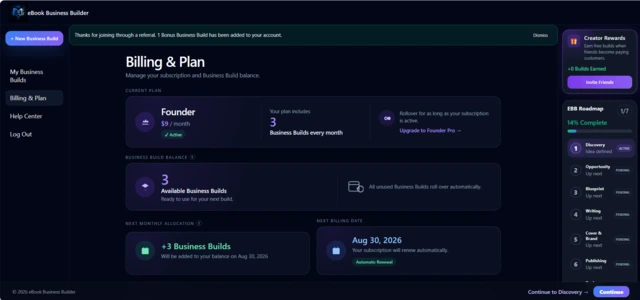
The Billing page displays the essentials of your account in one place:
Current plan — whether you are on Founder or
Founder Pro.
Monthly subscription — your plan's recurring
price.
Active status — confirmation that your
subscription is currently active.
Included Business Builds — how many builds
your plan adds each billing cycle.
This information lets you quickly confirm your account status without digging through settings or email receipts. If you ever wonder whether your plan is current or what you are paying for, start here.
Available plans include Founder (3 Business Builds per month) and Founder Pro (25 Business Builds per month). Your page reflects whichever plan is active on your account.
Understanding Business Builds
Every subscription includes a monthly allocation of Business Builds. Each Business Build allows the creation of one complete ebook business — from Discovery through Launch Marketing.
Once you start a project, that Business Build remains committed to it. You can continue editing and progressing through every phase without consuming additional builds. Business Builds are deducted when you begin a new project, not each time you open an existing one.
For a deeper explanation of how builds work across the workflow, see Business Builds Explained .
Business Build balance
Your available balance shows how many new Business Builds you can still start. This number updates automatically as builds are added to your account or used for new projects.
Before starting a new business from My Business Builds, check this balance on the Billing page. If you have builds available, you can begin immediately. If your balance is zero, you will need to wait for your next monthly allocation or earn additional builds through an upgrade or referral rewards.
Monthly allocation
New Business Builds are automatically added to your balance each billing cycle according to your subscription plan. You do not need to claim them manually — they appear on your renewal date.
The Billing page shows your Next Monthly Allocation section, including how many builds will be added and the date they arrive. That date aligns with your subscription renewal, so you always know when to expect fresh builds.
Founder plans receive 3 builds per cycle; Founder Pro plans receive 25. The exact number for your account is displayed on your Billing page under your current plan details.
Rollover
Unused Business Builds automatically roll over while your subscription remains active. If you use only one build in a month on the Founder plan, the remaining two stay in your balance and add to your next allocation.
Rollover lets you build at your own pace without losing unused allocations. Your balance can grow over time if you create projects less frequently than your monthly allowance — which is especially helpful when you are focused on completing one business thoroughly before starting the next.
Upgrading your plan
You can upgrade to Founder Pro directly from the Billing page. Upgrading increases your monthly Business Build allocation from 3 to 25 while keeping your existing projects and account settings unchanged.
After upgrading, your Billing page updates to reflect the new plan, price, and monthly allocation. Your next renewal and allocation dates adjust accordingly. If you are building more businesses than your current plan supports, upgrading is the simplest way to increase capacity without waiting month by month.
Creator Rewards
Successful referrals can earn additional Business Builds beyond your standard monthly allocation. When someone you refer purchases a plan, bonus builds are added to your balance automatically once referral requirements are met — you do not need to request them manually.
Referred users may also receive a complimentary build when they join. These rewards appear on your Billing page alongside your regular balance, giving you a clear view of everything available to you.
For full details on how referrals work, eligible rewards, and how to share your link, see the Referral Program documentation.
Renewal date
The Billing page clearly shows your next renewal date so you always know when your subscription renews and when your next monthly allocation will arrive. Both the Next Billing Date and Next Monthly Allocation sections use this date, keeping renewal and build delivery easy to track in one place.
Active subscriptions renew automatically each billing cycle. Your balance updates on that date with your new monthly builds, and any unused builds from the previous period remain in your account thanks to rollover.
Frequently asked questions
Do unused Business Builds expire?
No. Unused Business Builds roll over automatically while your
subscription remains active. They stay in your available balance
until you use them for a new project.
Can I upgrade my plan later?
Yes. You can upgrade to Founder Pro at any time from the
Billing page. Your monthly allocation increases immediately,
and your existing projects are unaffected.
Where can I see my next renewal date?
On the Billing & Plan page. Look for the Next Billing Date
and Next Monthly Allocation sections — both show when your
subscription renews and when new builds will be added.