My Business Builds
What you'll learn
This guide explains how the My Business Builds page works as your central workspace inside EBB. You will learn how projects are stored, how to continue existing work, how to start new businesses, and how each build moves through the guided workflow.
Introduction
The My Business Builds page is the main workspace where every Business Build you create is stored. Open it from the sidebar at any time to see all of your projects in one place — in progress, paused, or complete.
Whenever you start a new Business Build, it appears here automatically. You can return days or weeks later and continue exactly where you left off. Nothing is lost between sessions; your progress is preserved throughout the entire EBB workflow.
Think of this page as your home base. Every phase — from Discovery through Business Assets — connects back to the projects listed here. It is the hub that keeps your ebook businesses organized as you build.
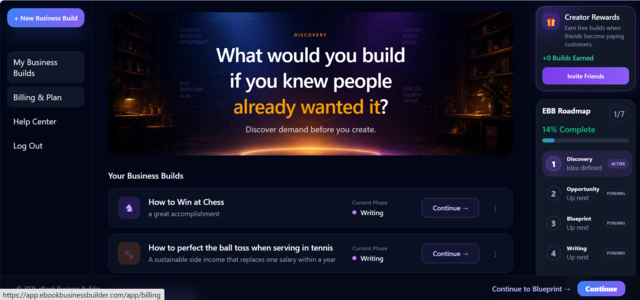
Your business dashboard
This page gives you a complete overview of all your Business Builds without opening each project individually. Every row displays the information you need to decide what to work on next:
Business name — the title of your ebook
business project.
Short description — a summary of the topic
or audience.
Current phase — where the project sits in
the EBB workflow.
Progress — visible through the current phase
indicator, so you know how far the build has advanced.
Continue — opens the project at its saved
phase so you can pick up immediately.
Whether you are managing one business or several, this dashboard keeps everything accessible from a single location. You never need to remember which phase you stopped on — the page shows it for you.
Starting a new Business Build
Select + New Business Build to begin a completely new project. Each Business Build follows the same guided EBB workflow:
Discovery · Opportunity · Blueprint · Writing · Cover & Brand · Publishing · Business Assets
Each new project consumes one available Business Build from your balance. Check your available builds on the Billing & Plan page before starting. For a full explanation of how builds are allocated and consumed, see Business Builds Explained .
Continuing existing projects
Select Continue on any project row to resume that Business Build at its current phase. EBB opens the correct workspace — Discovery, Writing, Publishing, or wherever you stopped — with your saved content intact.
Progress is saved automatically as you work. You can build at your own pace, pause for days or weeks, and return without losing anything. No additional Business Builds are consumed when continuing an existing project — the build was committed when you started it.
When a project reaches the final phase, the button changes to Open so you can revisit your completed Business Assets and supporting materials at any time.
Tracking progress
Every Business Build displays its current stage within the seven-phase workflow. At a glance you can see:
which phases have been completed · which phase is active now · how far the project has progressed toward a finished ebook business
This visibility helps you plan your time. If one project is in Writing and another is still in Discovery, you know exactly where to focus without opening each build separately. The phase label updates as you advance through the workflow, giving you a reliable picture of every project's status.
Managing multiple businesses
Many EBB users create more than one ebook business — different topics, audiences, or product ideas. The My Business Builds dashboard is designed for exactly that.
Each project maintains its own content, branding, and progress independently. Working on one build does not affect another. You might advance a parenting ebook through Writing while a fitness guide sits paused in Blueprint — both remain available whenever you are ready to continue.
Your available Business Build balance on the Billing & Plan page determines how many new projects you can start. Existing projects are always accessible regardless of your balance.
Frequently asked questions
Can I work on more than one Business Build?
Yes. Each Business Build is stored separately and can be
continued independently.
Does continuing a Business Build use another Business Build?
No. Business Builds are only used when starting a brand-new
project.
Where do I see my progress?
Each Business Build displays its current phase on the My
Business Builds page so you always know where you are in
the workflow.
Can I return later?
Yes. Progress is saved automatically and you can continue
from where you left off.
Your business library
Over time, the My Business Builds page becomes a library of completed and in-progress ebook businesses. Projects you finished months ago sit alongside ones you started yesterday — all accessible from the same workspace.
This gives you one place to manage ideas, continue active projects, and build multiple digital businesses using the EBB workflow. Whether you are launching your first ebook or your fifth, everything lives here — ready whenever you are.